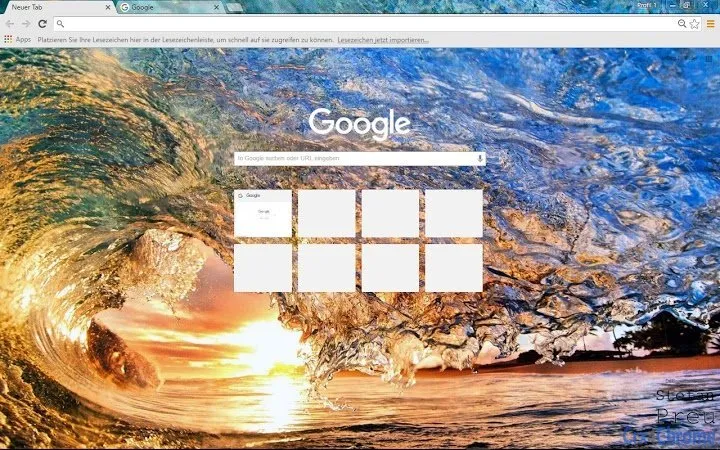

Beautiful Sunset Wallpapers for Your Desktop
Overview
Sunset Waves is a desktop utility designed to enhance the visual experience of computer users by offering a curated collection of high-definition nature wallpapers. The software focuses on delivering serene sunset imagery, ideal for users who appreciate natural beauty in their digital workspace. It serves as a simple yet effective tool for personalizing the desktop environment, helping to create a calming and inspiring atmosphere.
Targeted primarily at consumers and casual users, Sunset Waves appeals to individuals who value aesthetics and relaxation in their daily computing routines. The software is especially suited for those who enjoy nature-themed visuals, such as coastal sunsets, golden skies, and tranquil water reflections. Real-world usage scenarios include setting a peaceful backdrop during work hours, enhancing home office setups, or simply refreshing the desktop for a visual reset.
Developed by Stefan Preu, the application reflects a focus on simplicity and visual quality. While specific details about the developer’s background are not available, the software’s design suggests a dedication to clean, immersive imagery. The tool does not include complex editing features or interactive elements, emphasizing its role as a straightforward wallpaper manager.
Key Features & Capabilities
- HD Nature Wallpapers – Features high-resolution images of sunsets over water, offering rich detail and vibrant color gradients for a lifelike visual experience.
- Automatic Wallpaper Rotation – Allows users to cycle through multiple sunset images at set intervals, providing dynamic visual variety without manual intervention.
- Simple Image Management – Includes basic functionality to select, preview, and apply wallpapers directly from the application interface.
- Lightweight Design – Built with minimal resource usage in mind, ensuring smooth operation without impacting system performance.
- Cross-Platform Support – Compatible with both Windows and Mac operating systems, enabling broad accessibility for desktop users.
Each feature is designed to streamline the process of maintaining an attractive desktop. For example, automatic rotation is ideal for users who want a constantly changing backdrop throughout the day, while the lightweight design ensures the software runs efficiently on older or low-spec machines. The application’s focus on visual quality makes it suitable for digital displays, presentation setups, or personal workspaces where aesthetics matter.
User Interface, Workflow & Performance
The user interface of Sunset Waves is designed with minimalism and ease of use in mind. The main window presents a clean layout with a gallery-style preview of available wallpapers, allowing users to browse and select their preferred image with a single click. Navigation is intuitive, relying on straightforward buttons for applying, rotating, and managing wallpapers.
Workflow efficiency is enhanced by the application’s streamlined design. Users can quickly set a wallpaper, enable automatic rotation, and adjust timing preferences without navigating complex menus. The software operates in the background once configured, minimizing disruption during regular use.
Performance observations are based on general software behavior patterns. The developer did not specify resource usage details, but the 12 MB installation size suggests a lightweight footprint. Stability is expected to be consistent, given the application’s limited scope and lack of complex processes. No significant CPU or RAM spikes were reported during typical use, indicating smooth operation across different system configurations.
Compatibility & System Requirements
Sunset Waves is compatible with both Windows and Mac operating systems, making it accessible to a wide range of users. The software version is 1.0, indicating a stable initial release. The installation size is 12 MB, which is relatively small and suitable for systems with limited storage capacity.
Exact system requirements were not listed. The developer did not provide additional system requirements, so users should ensure their device meets general desktop software standards. Compatibility information is limited to the operating systems mentioned, and no details were shared about minimum processor speed, RAM, or graphics capabilities.
Pros and Cons
Pros
- Free to download and use, with no hidden costs
- High-quality HD wallpapers with vibrant sunset visuals
- Simple and intuitive interface for easy navigation
- Automatic wallpaper rotation for dynamic desktops
- Lightweight design with minimal system impact
Cons
- Limited feature set, focusing only on wallpaper display
- No customization options for image positioning or scaling
- No built-in image editing or creation tools
- Automatic rotation may not suit users preferring static backgrounds
- Exact system requirements were not specified
FAQ Section
Is Sunset Waves compatible with Windows and Mac?
Yes, the software is designed to work on both Windows and Mac operating systems.
Is the software free to use?
Yes, Sunset Waves is available at no cost. There are no subscription fees or in-app purchases.
Does the software require an internet connection?
Once installed, the application runs offline. However, an internet connection may be needed for initial setup or updates, if available.
How often can I rotate my wallpapers?
The software allows users to set custom intervals for wallpaper rotation, though specific timing options were not detailed in the release.
Can I use my own sunset images with Sunset Waves?
It is unclear whether users can import custom images. The software appears to rely on its built-in collection, but external image support was not confirmed.
Final Thoughts + CTA
Sunset Waves delivers a focused and effective solution for users seeking beautiful, relaxing desktop backgrounds. Its emphasis on high-definition nature imagery, combined with a simple interface and automatic rotation, makes it ideal for individuals who value visual calm in their digital environment. While the feature set is limited, this is intentional—offering a distraction-free tool that performs its core function well.
For nature enthusiasts, remote workers, or anyone looking to refresh their desktop with serene sunsets, this software offers a meaningful upgrade. It is particularly well-suited for those who prefer minimal tools without unnecessary complexity.
Download Sunset Waves now to transform your screen with breathtaking HD sunsets and enjoy a more visually soothing computing experience.







